WCAG A vs AA vs AAA: What Each Level Covers, What It Costs, and How to Choose
WCAG defines three conformance levels, each building on the last. Learn what Level A, AA, and AAA require in practice, the effort involved in reaching each one, and how to decide which target fits your organization's users, industry, and legal obligations.
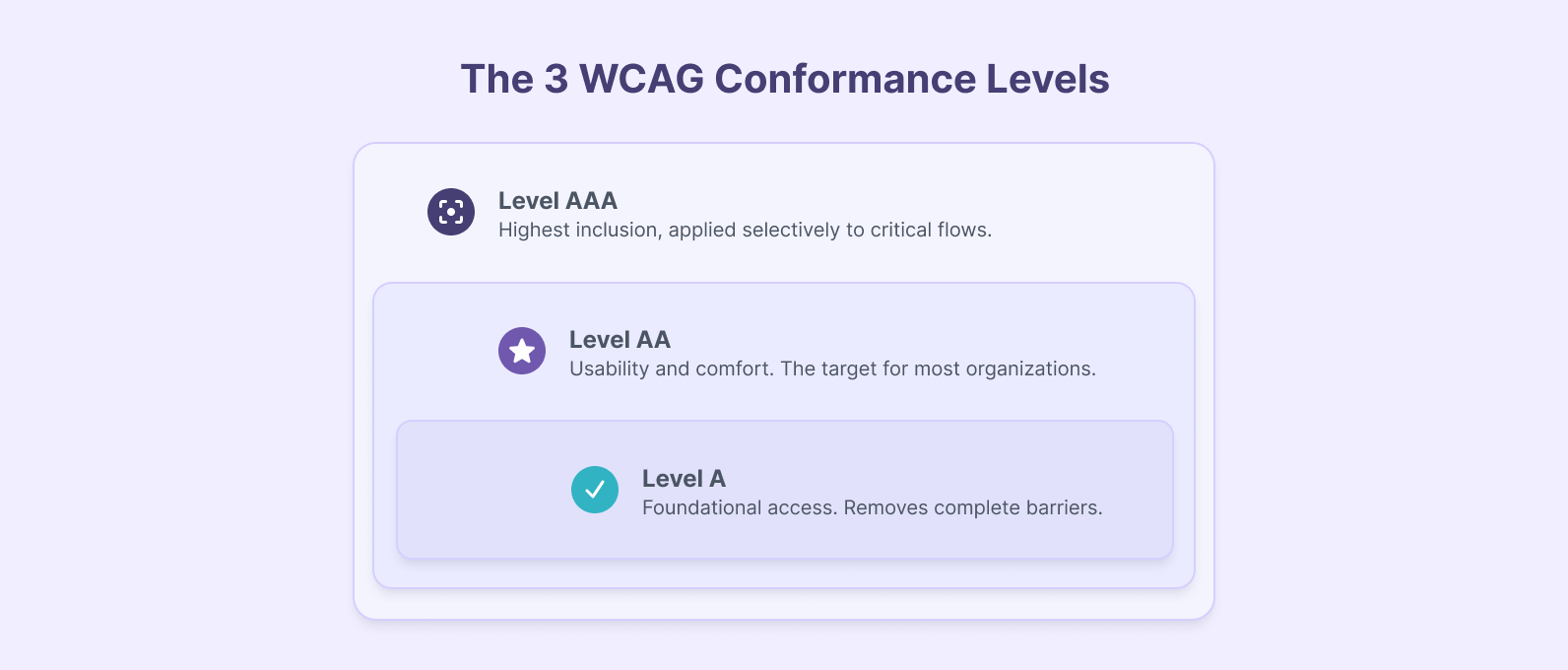
Quick Summary
- Three levels, one framework. WCAG sorts accessibility into Levels A, AA, and AAA, all built on the same four principles: perceivable, operable, understandable, and robust content.
- Level A removes the barriers that block access entirely. It decides whether a person using assistive technology can reach your content at all.
- Level AA is the target for most organizations. It is the level referenced by the ADA, the European Accessibility Act, AODA, and Section 508.
- Level AAA is selective, not universal. The W3C advises against requiring it site-wide, though specific criteria are worth applying to high-stakes flows.
- The real work is deciding which level you need. That comes down to legal obligations, industry, user base, and the effort each step takes relative to its impact.
- Auditing takes both automation and human judgment. AI-augmented review is starting to close the gap between the two.
WCAG organizes accessibility requirements into three conformance levels: A, AA, and AAA. Generally, organizations know they need to meet one of them, but few know how to decide which one actually fits their situation until it’s already late.
Much of the writing on this topic summarizes the spec, lists what each level requires, says “target AA,” and stops. That is accurate but incomplete. The real decision involves legal obligations, industry context, the population your site serves, and how much effort your team can absorb, and none of that shows up in a criteria list.
This guide breaks down what each level requires, where the lines between them matter in practice, and how to choose the right target for your organization. For the underlying principles and the legal landscape in depth, see our Brief Introduction to Web Accessibility (A11y).
What Are WCAG Conformance Levels?
WCAG is built on four principles, often shortened to POUR: content must be perceivable, operable, understandable, and robust. Every success criterion in the standard maps to one of these four, and the three conformance levels determine how thoroughly each principle is addressed.
The levels build on each other. Level AA includes everything in Level A plus additional criteria, and Level AAA includes everything in both. You cannot claim AA conformance without also meeting every Level A criterion.
WCAG 2.2, published in December 2024, is the current version. The three-level structure has stayed consistent across 2.0, 2.1, and 2.2. What changes between versions is the criteria themselves, not the conformance framework.
The table below compares the three levels on the terms a decision-maker actually weighs: what each one addresses, the effort it takes, when to target it, and where it sits legally.
| Level | What It Addresses | Effort to Implement | When to Target | Legal Status |
|---|---|---|---|---|
| A | Complete access blockers: text alternatives, keyboard access, form labels, seizure prevention, prerecorded captions. | Lowest. Mostly straightforward markup corrections. | Minimum baseline for any project. | Implied prerequisite in most regulations. |
| AA | Usability and comfort: 4.5:1 contrast, heading structure, consistent navigation, focus indicators, live captions. | Moderate. Design and development coordination, ongoing testing. | The target for most organizations. | Referenced by ADA, EAA, AODA, Section 508. |
| AAA | Highest inclusion: 7:1 contrast, sign language for video, extended audio descriptions, lower-secondary reading level, no time limits. | Significant. Some criteria cannot apply to all content types. | Selective use on critical flows. | Not recommended by W3C as a blanket requirement. |
WCAG Level A: The Minimum Accessibility Baseline
Level A addresses the criteria that remove complete access blockers: the requirements that determine whether someone with a disability can use the site at all. When a Level A criterion fails, a person using assistive technology often cannot complete the task, rather than simply finding it harder.
The core Level A requirements include text alternatives for non-text content, full keyboard operability, form input labels and instructions, protection against content that flashes more than three times per second, and captions for prerecorded audio. One of the most recognizable accessibility rules actually sits at Level A: information cannot be conveyed by color alone, so a required field marked only in red or a link signaled only by color fails.
WCAG 2.2 also added two Level A criteria worth noting: Consistent Help, meaning help mechanisms appear in the same relative place across pages, and Redundant Entry, meaning the site does not force users to re-enter information they have already provided in the same process.
We won't re-explain the fixes here, because we have documented them with examples in How to Tackle Web Accessibility Requirements. What is worth adding is which failures actually show up in audits.
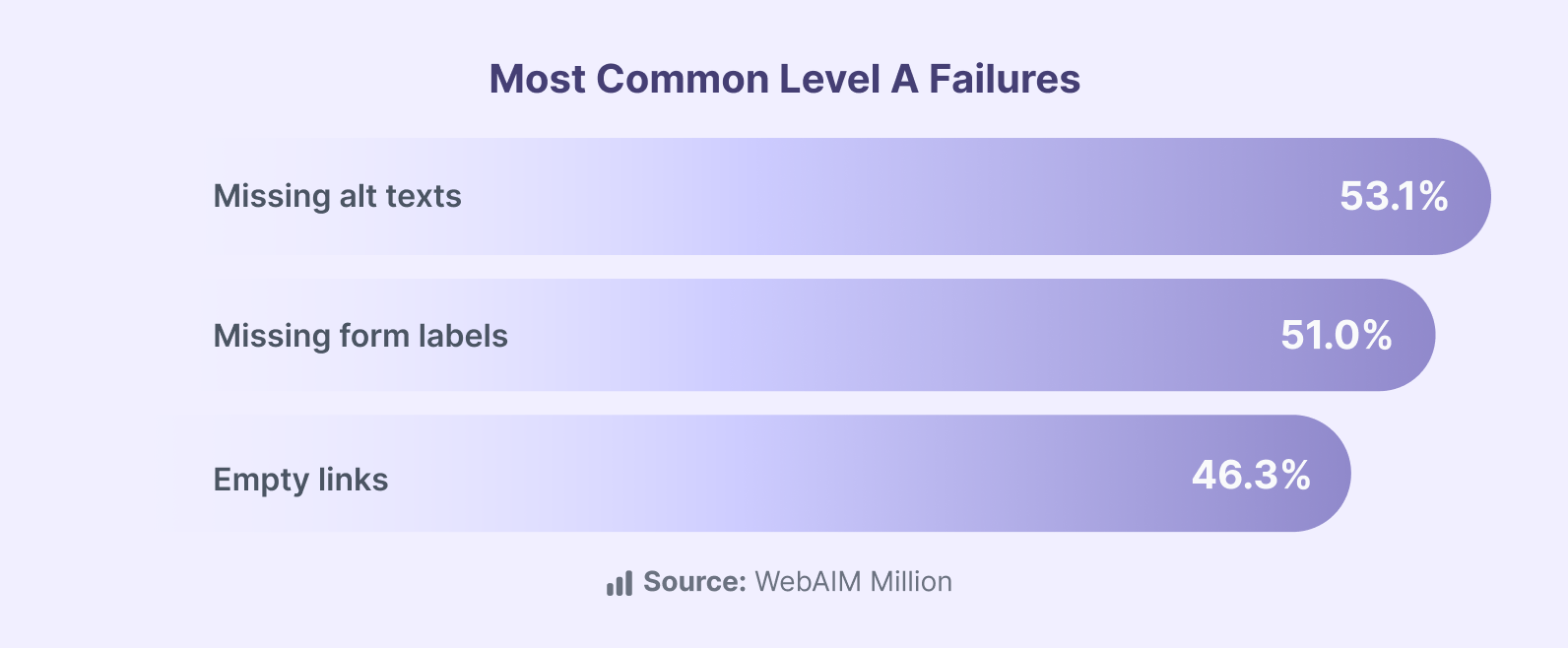
The same failures show up across audits regardless of company size or industry. Unlabeled form fields, keyboard traps in modal dialogs, and missing alt text on linked images are the most persistent. They survive because they are invisible to anyone not using assistive technology, which means they pass QA processes that do not explicitly test for them.
WCAG Level AA: The Standard Most Organizations Should Target
Where Level A addresses whether someone can access content at all, Level AA addresses whether they can use it comfortably and efficiently.
The key additions include a minimum contrast ratio of 4.5:1 for normal text and 3:1 for large text, logical heading structure, consistent navigation across pages, visible focus indicators for keyboard users, captions for live audio, and content that adapts to different screen orientations without losing function.
Level AA is where legal frameworks converge. The U.S. Department of Justice references WCAG 2.1 Level AA for ADA compliance, with phased deadlines through 2027.
The European Accessibility Act, in force across EU member states since June 2025, points to AA. AODA in Canada requires AA. Section 508 for U.S. federal agencies references AA. When an organization says it needs to be compliant, AA is almost always what it means.
WCAG 2.2 introduced several new AA criteria that speak directly to current development work:
| New AA criterion (WCAG 2.2) | What it requires |
|---|---|
| Focus Not Obscured (Minimum) | A component receiving keyboard focus is not entirely hidden behind sticky headers, footers, or overlays. |
| Dragging Movements | Anything done by dragging also works with a single pointer, such as a tap or click. |
| Target Size (Minimum) | Interactive targets are at least 24 by 24 CSS pixels, or have enough spacing around them. |
| Accessible Authentication (Minimum) | Login does not depend on a cognitive test like recalling a password or solving a puzzle, unless an alternative exists. |
These are new territory for most teams, and they describe what the development team needs to build, test, and maintain.
For teams that need help reaching or holding AA on a live product, our Web Accessibility service is built around that work.
WCAG Level AAA: When the Highest Standard Makes Sense
Level AAA represents the most thorough standard WCAG defines. Its requirements include a 7:1 contrast ratio, sign language interpretation for prerecorded video, extended audio descriptions, content written at or below a lower-secondary reading level, the removal of time limits, and definitions for every abbreviation.
The W3C states that AAA conformance is not recommended as a general policy for entire sites, because some content cannot satisfy every AAA criterion. A news site cannot rewrite every article to a lower-secondary reading level. A video platform cannot provide sign language interpretation for every piece of user-generated content.
Where AAA becomes practical is in selective use on high-stakes flows. Checkout, authentication, medical intake, and government benefit applications all carry higher consequences when a user hits a barrier. Applying specific AAA criteria to those flows, such as error prevention with a review-and-confirm step, extended time limits, or simplified language in critical instructions, delivers real gains without requiring full-site AAA.
How to Decide Which Level Your Organization Needs
The right target is full Level AA conformance, plus selective AAA criteria on the flows where a barrier costs a user the most. Getting to that answer for your own case comes down to four factors.
- Legal floor by jurisdiction. ADA and DOJ in the U.S. point to AA. The European Accessibility Act mandates AA since June 2025. AODA in Canada requires AA. Section 508 references AA. If you operate across jurisdictions, the highest standard among them sets your baseline.
- Industry context. Healthcare portals, educational institutions under Section 508, government agencies, and e-commerce checkouts each face different regulatory pressure and serve different user populations. These are the sectors that most often benefit from selective AAA on their most critical flows.
- User population. If analytics or research show above-average assistive technology usage, or your audience skews toward demographics with higher rates of disability, the calculation shifts beyond a blanket AA recommendation.
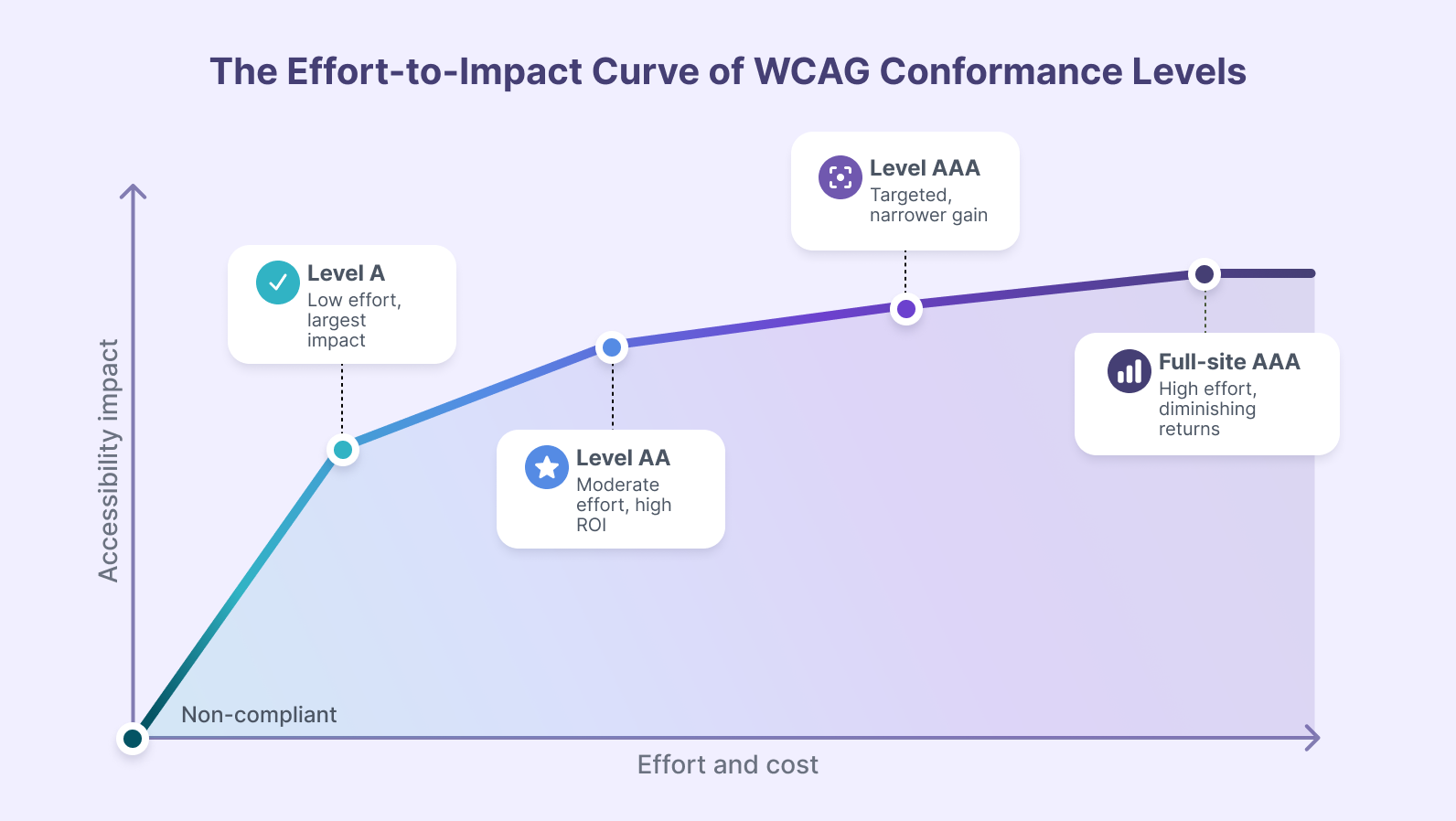
- Effort-to-impact ratio. The steps are not equal in cost or return, and the curve below is the honest version of the trade-off.
How to Audit Your Site Against WCAG Conformance Levels
Knowing which level to target is one decision. Knowing whether your site meets it is a different problem, and the approach determines how much confidence you can place in the result.
The three approaches, and where each one fits:
| Approach | What it catches | Trade-off |
|---|---|---|
| Automated scanning | Code-level issues: missing alt attributes, insufficient contrast, missing labels, missing page language. | Fast and scalable, but evaluates only part of the criteria and cannot judge quality or context. |
| Manual expert testing | Keyboard flow, screen reader behavior, alt text quality, heading logic, whether errors help recovery. | Thorough, but expensive and a snapshot that ages with every deployment. |
| AI-augmented auditing | Extends automation into judgment: whether alt text describes the image, whether a form flow makes sense, whether link text is clear. | Narrows the gap between scans and human review, and scales in a way manual auditing cannot. |
The AI-augmented approach is what our engineering team built for our own accessibility audit workflow, combining Playwright for browser automation with AI agents for contextual evaluation.
See how AI-augmented auditing works in practice. Our webinar walks through our proprietary tool end to end, auditing a live site against real conformance criteria. Watch it in full here.
What's Coming in WCAG 3.0
WCAG 3.0 is still in draft and will not replace WCAG 2.2 in the near term, but its direction is worth understanding, because it is the most significant structural change to accessibility standards since WCAG 2.0 launched in 2008.
Beyond the rating model, WCAG 3.0 expands scope beyond web content to mobile apps, software, VR and AR, and connected devices. It also introduces the APCA contrast algorithm, designed to handle modern patterns like dark mode and thin fonts more accurately than the current formula.
Meeting WCAG 2.2 Level AA today positions you well for whatever 3.0 becomes. The POUR principles carry forward, and the foundational practices stay at the core of accessibility regardless of how the measurement evolves.
Choosing a conformance level is the easy part of accessibility. The work that moves the needle comes after: auditing an existing site honestly, prioritizing the failures that block real users, and holding the standard as the product keeps shipping. That is where accessibility efforts usually stall, because the audit is tedious, the backlog is long, and the next feature always feels more urgent.
This is the problem our team works on. We audit sites against the conformance level that fits the organization, using a mix of automated tooling, AI-augmented review, and manual expert testing, and we help teams build accessibility into how they ship rather than treating it as a one-time cleanup.
Talk to our team. Tell us your target level and your stack, and we will scope what reaching it takes.
Frequently Asked Questions
About the author
Rosa López, Front-End Developer
I am a Front-End developer with 4 years of experience, passionate about continuing to explore two worlds in depth: the digital world of accessible front-end development and the physical world we live in.
Related Content
AI vs. Automation: What’s the Difference and How to Choose the Right Layer
By David Cespedes, July, 11, 2026What is the difference between AI and automation, and how do you decide which layer belongs where? Here’s our practitioner’s decision framework from enterprise pipeline implementations.
What Is Business Process Automation and How to Define What to Automate First
By David Cespedes, June, 17, 2026Business process automation works when you define the right processes first. We discuss how to identify automation candidates and avoid the most common failure modes from our enterprise experience.