Design System Audits for AI: Where to Start and How to Run Your Own
A design system audit for AI checks whether agents can actually read and build with your system. Here is what an audit covers, how we approached ours, and where to start running your own, whether your team is small or large.
Quick Summary
- A design system audit for AI adds a second question to the traditional review. Audits have always checked the health and structure of a system. Now they also check whether an agent can read the system and build with it without guessing, because agents do not have the context teammates share out loud.
- The design system is infrastructure, and it carries the brand. It holds a living collection of decisions that explain what to build, how to build it, and why. It also holds the consistency and recognition that keep a product identifiable when AI can generate almost anything.
- An audit covers five areas, with adoption running across all of them. Those areas are semantic naming and tokens, component architecture, layout structure, context and documentation, and basic accessibility. Adoption measures how much of the file actually uses the system compared with detached instances and hardcoded values.
- A working system can still fall short for agents. People interpret, ask, and fill gaps, while agents make assumptions that show up as rework in review. In tests on a client project, an agent took about 14 minutes to build a component from existing documentation and about 7 minutes after the Figma file was made AI-ready.
- You can run the audit yourself in seven checks. Start with a component inventory, then review the token layer, layout structure, naming and descriptions, basic accessibility, adoption, and sources of truth. A plugin such as FigmaLint can speed up parts of the review.
- You do not need a rebuild. Small teams can start with their most-used components. Large teams can start with the audit to find where documentation, architecture, and production code are out of step, then validate on one component before scaling.
The purpose of a design system audit hasn’t changed. It has always been a review of how a system is organized: the components, the tokens, and the series of decisions that let a team build consistently.
What did change is who reads the system. Design systems have been people-centric for most of their history, which meant they worked differently depending on who was looking at them. A designer who had been on the team for years could fill in what the documentation left out, and a new hire could ask. Because of that, documentation was often postponed, since the context could be understood without it.
With AI, that no longer holds. Agents read what is in the file and build from it, so every gap in the system becomes a guess they have to make, and they repeat those guesses faster than any team could. That is the real risk of leaving those gaps open.
With that in mind, we will go over what makes up a design system audit, how to run one for AI, why it matters today, and how we approached ours at Octahedroid, whether your team is small or large.
The Design System Became Infrastructure
We think of a design system as organizational infrastructure with a living collection of decisions inside. It brings together a team’s knowledge, context, and design principles in one place, and it keeps changing as the product does.
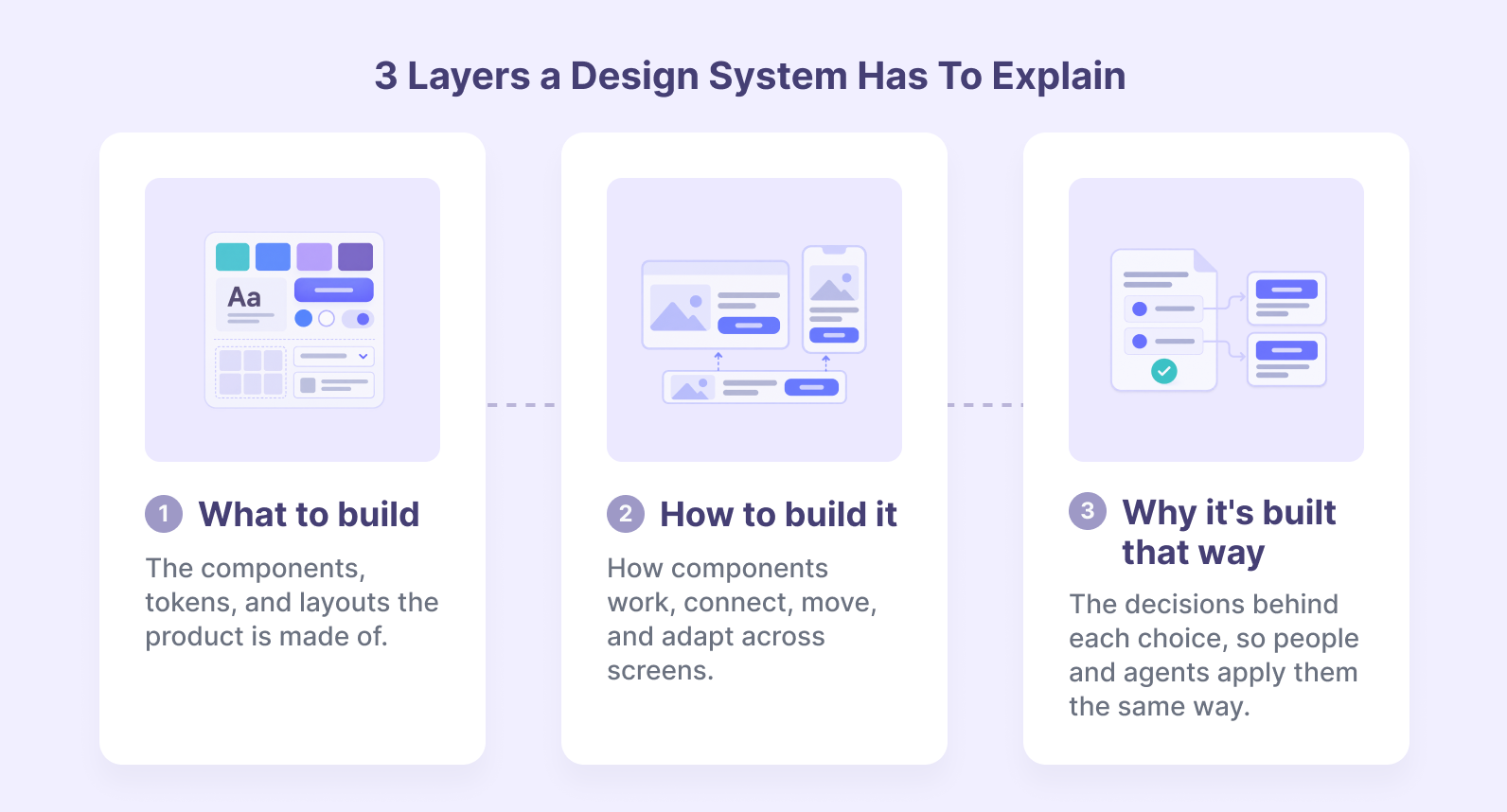
For an agent to use that infrastructure, the system has to explain three layers: what to build, how to build it, and why it is built that way.
The how and the why are the layers an agent cannot guess. A button component shows what a button looks like. Only the structure and documentation around it say when to use it, which variant fits, and what the team already decided about it.
The same system also carries the brand. Consistency, predictability, and recognition are what a design system gives a product, and they matter more when AI can generate almost anything.
Interfaces made by agents can start to look alike very quickly. What keeps a product recognizable is the consistency of the decisions behind it, and those decisions live in the system.
There is also a business reason, since a readable system lets a team move faster with AI without drifting from what has already been agreed. When the system is not readable, the gaps are paid for later in review time, inconsistencies, and corrections during development.
What a Design System Audit Checks
Structure matters more than where the design system lives: whether yours is in Figma, in code, or in both, what counts is that components, tokens, naming, and usage rules are consistent and documented.
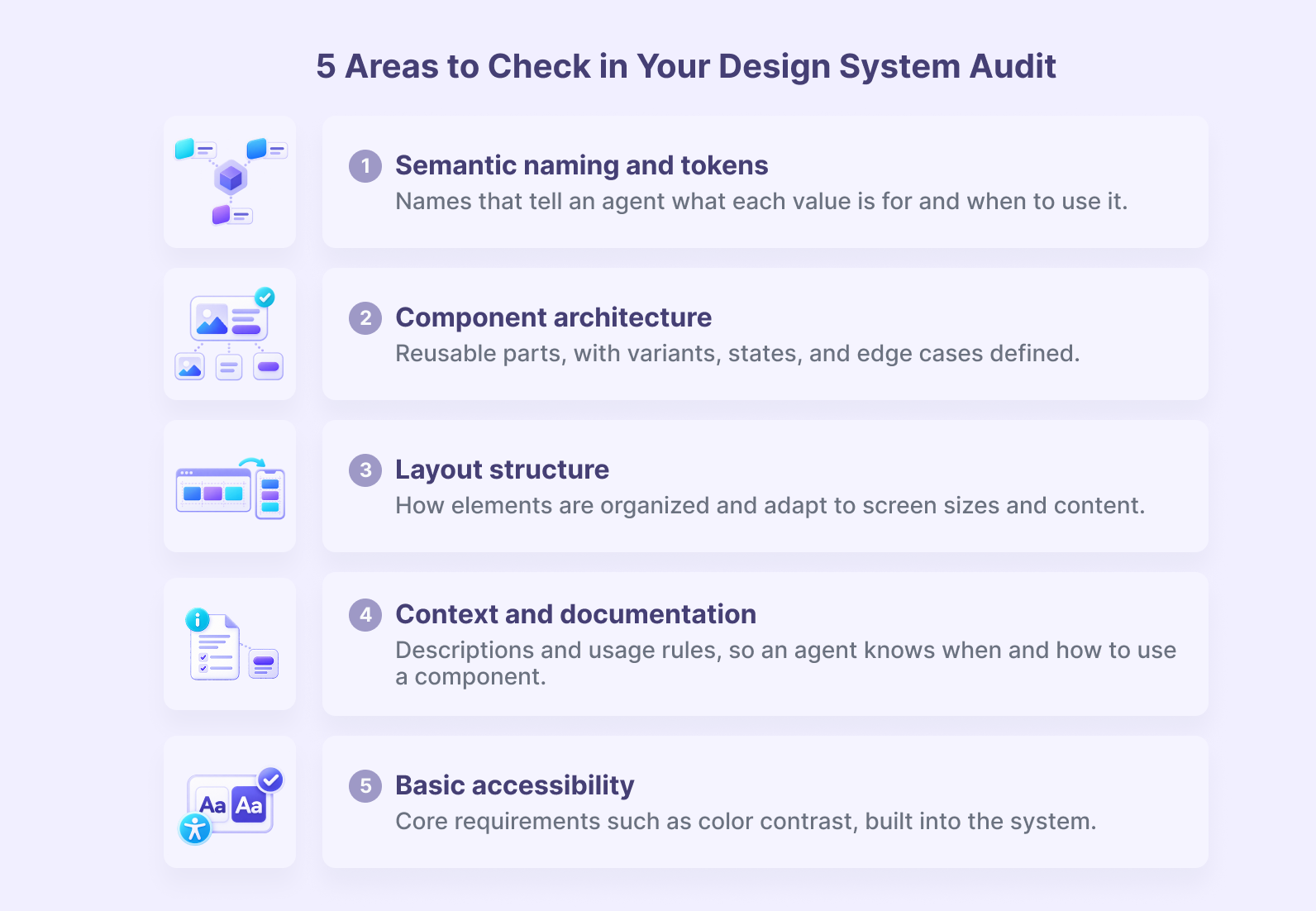
When we audited our own system, we reviewed five areas:
1. Semantic Naming and Tokens
Names should tell an agent what each value is for and when to use it. A token called “blue” describes a color. A token that names its role tells the agent where it belongs.
2. Component Architecture and Reusability
Components should be built from reusable parts, with variants, states, and edge cases defined. This is where the most expensive debt tends to hide, and the area that shapes how an agent assembles larger interfaces.
3. Layout Structure
Layout structure covers how elements are organized and how they adapt to screen sizes and content. An agent needs to see the rules that make a layout flexible, not only the final arrangement.
4. Context and Documentation
Descriptions and usage rules give an agent the context a teammate would share out loud: what a component is, when to use it, and when not to.
5. Basic Accessibility
Core requirements, such as color contrast, should be built into the system so every component an agent generates inherits them. For a closer look at how we audit accessibility and measure the results, see Beyond Basic Compliance: Our Web Accessibility Audit Approach and Metrics, or learn about our web accessibility practice.
Adoption runs across all five areas. It measures how much of the file actually uses the system, compared with detached instances and hardcoded values.
A system can be well designed and still be barely used, and an agent working from that file inherits the same habits.
How We Approached Our Own
Our documentation worked well for our team. People knew where to look and filled the gaps with what they already knew.
The audit showed where an agent would still have to guess.
We responded with four changes:
- Tokens in layers. We restructured our tokens into primitive, semantic, and component layers, so an agent can tell what each token is for and a change at the base carries through the rest.
- Atomic components. Our components follow atomic design principles, with variants, states, and edge cases defined, and system primitives reused in place of detached instances.
- One structure in two places. We use a hybrid approach: the same structure and conventions in Figma and in code, so agents can work from either source depending on the task.
- Validation before scaling. After the fixes, we tested an agent on a button to see whether it translated the design decisions into code correctly. Then we moved to a hero section to test how it handles several components and the relationships between them.
Those tests also gave us a useful reference point, which we come back to below.
Why a Working System Still Needs an Audit
A system can work well for people and still fall short for agents. People interpret, ask questions, and fill in the gaps as they go, while an agent simply makes assumptions.
In practice, those assumptions show up as a component used incorrectly, a pattern that looks like yours but doesn’t follow the system, or hardcoded colors and type styles that pass a first look and come back as rework in review. They are hard to spot when the team reviews the system as a whole, because the team already knows what everything was meant to be.
Accessibility follows the same logic. When agents generate interface code faster, accessibility issues multiply at the same speed, which we cover in Why AI-Generated Code Raises the Stakes for Accessibility Testing.
Human criteria still set the rules. AI can apply decisions at scale, but the design knowledge has to come from people, which is the same principle behind our human-assisted AI development framework. The audit is where those decisions get written down in a form an agent can follow.
We saw that difference in tests on a client project. Building a component from the existing documentation alone took an agent about 14 minutes, because it had to guess the layer structure and hunt for the tokens in use. Once the Figma file was made AI-ready, the same task took about 7 minutes, half the time.
How to Run the Audit Yourself
You can run this audit with a design file and a checklist. Work through the checks in order and note what you find as you go.
Start With an Inventory
List your components and check whether they are built from reusable parts or from one-off pages and blocks, since architecture is where the most expensive debt hides.
Look for an atomic structure, where reusable primitives or atoms (buttons, inputs, images) combine into larger components such as molecules and organisms (forms, cards).
This structure helps agents reuse existing components and follow their defined rules when building more complex interfaces.
Check the Foundations and the Token Layer
Confirm that foundational values, such as colors, typography, spacing, and radius, are bound to named tokens or variables where appropriate.
Then check that those tokens are organized into primitive, semantic, and component layers, with no raw values or off-scale spacing loose in the file.
Check Layout Structure
Confirm that auto layout defines how elements are organized and how they adapt to screen sizes and content.
Review Naming and Descriptions
Names should carry meaning, and each component should say what it is, when to use it, and when not to, since that is the context an agent reads.
Check Basic Accessibility
Confirm that accessibility requirements, such as color contrast, text size and legibility, focus states, keyboard behavior, and accessible labels, are defined in the system. If you need to decide which conformance level to target, see WCAG A vs AA vs AAA: What Each Level Covers, What It Costs, and How to Choose.
Check Adoption
Measure how much of the file uses the system compared with detached or hardcoded elements.
Check Sources of Truth
If the same spec lives in Figma, in Markdown, and in code, decide which one leads and how the others stay in sync. The closer Figma and code match, the easier it is for an agent to move between them.
If you want a tool to speed up parts of this review, FigmaLint is a good place to start. It is a recent Figma plugin created by TJ Pitre, who works with the Figma team, and it is the most serious option available right now. It helps audit tokens, states, accessibility, token binding, and layer names, and Smashing Magazine’s recent guide to making a design system AI-ready uses it as its audit step.
A plugin gives you a fast baseline. A more autonomous, custom-built approach, like the one we built for our own file, is also useful, because it can check the conventions that are specific to your system.
Turning the Audit into a Plan
You do not need a rebuild. Start with what you already have.
For small teams, start with the most frequently used components, set clear naming, document their behavior, and test them with an agent on a real task.
For large teams, the system may be mature, but documentation, component architecture, and production code are often out of step. Start with the audit to find where, then set shared criteria across design and development.
Sort findings by what blocks an agent first. Missing tokens and broken architecture come before cosmetic naming.
Validate on one component before scaling. Test a primitive first, then a composed one, and repeat the pattern once the agent reads it correctly.
Keep a record of decisions and set a cadence, so the audit becomes a standing check as the system grows.
Ready to See Whether Agents Can Read Your Design System?
The checks in this article are the same ones we use to review a system before agents start building from it. Knowing where the gaps are before the work begins is what keeps AI output consistent with the decisions your team has already made.
We have run this process on our own system and on client projects. Depending on where your team is, we can start with a quick check that gives you a baseline, or go straight to a deeper audit that goes through your token layer and naming and looks at whether your live product actually uses the system. Talk to our team about your design system with no commitment, and we will help you decide which one fits. Either way, you will know where the gaps are before an agent starts building.
Frequently Asked Questions
A design system audit for AI is a structured review of a design system’s components, tokens, naming, documentation, and adoption that also checks whether an agent can read and build with the system without guessing. It shows where the system is consistent, where it has drifted, and what to fix first.
About the author
Betsy Amparán, Product Designer
A versatile designer specializing in Product Design with a strong background in Visual Communication and Branding. My passion lies in crafting solutions that deeply resonate with people's needs and aspirations.
Related Content

Our Human-Assisted AI Development Framework for Production Systems
By Jesus Manuel Olivas, January, 6, 2026